FaxTalk Fax Merge Add-in fails when clicking Yes to Start the Fax Merge.

A compile error in a hidden module or run-time error occurs when you click Yes to start the fax merge. This halts the execution of the merge. This error occurs if you are using Microsoft 365 or Word 2024.
In Microsoft 365 and Office 2024, the settings for ActiveX controls have changed to be disabled by default. When ActiveX controls are disabled, you will not be able to create new ActiveX objects or interact with existing ones. This change applies to Word, Excel, PowerPoint, and Visio.
The FaxTalk Fax Merge features an ActiveX component that shows the fax merge progress with a progress bar. The error message pops up because Word can’t run this part of the FaxTalk Merge.
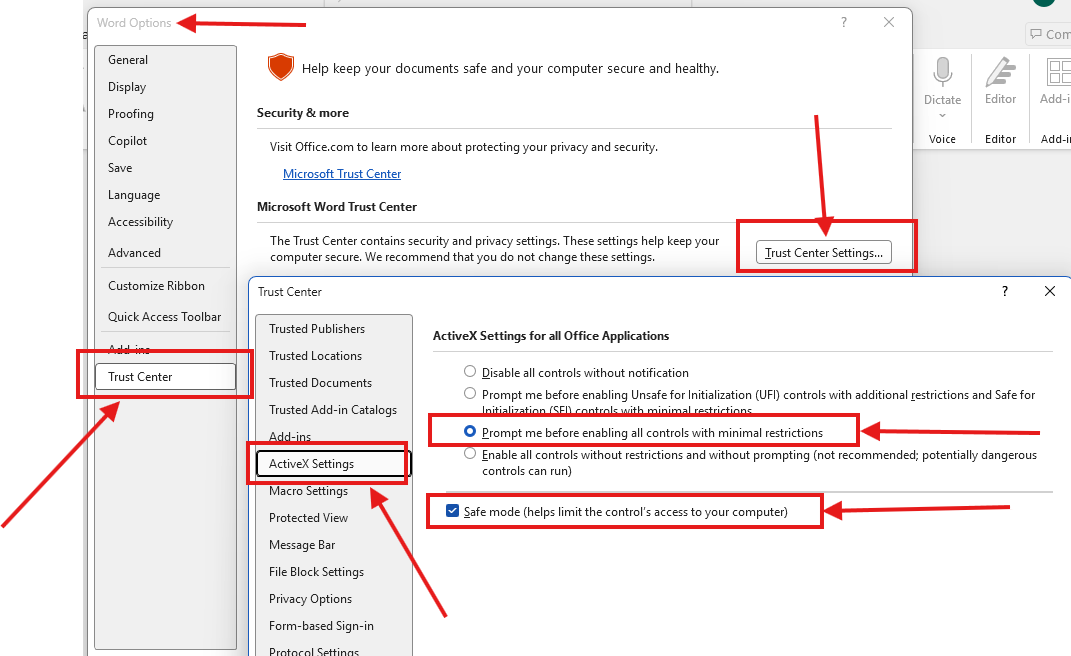
- In Microsoft Word, Select File, then Options.
- Select Trust Center, then the Trust Center Settings button.
- Select ActiveX Settings.
- If your current setting is set to disabled, select Prompt me before enabling all controls with minimal restrictions.
- Enable the option Safe Mode
- Select OK, then OK again to save your settings and exit Microsoft Word.
- Restart Microsoft Word and try merging again.
NOTE: Changing the above ActiveX settings will apply to all Office applications: Word, PowerPoint, Excel, and Visio.
no comments