Recommended modems for use with FaxTalk fax software.

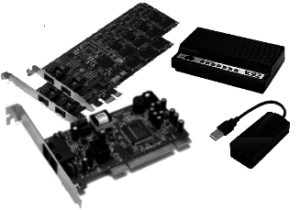
To send and receive faxes with FaxTalk software, you’ll need a fax modem for a traditional analog line. Alternatively, you can use a T.38 fax service provider for sending and receiving faxes via an internet connection. You can skip the requirements of fax modem hardware and a telephone line when using a T.38 fax service provider.
If you choose to send and receive your faxes using a traditional analog telephone line, you’ll need a Fax Modem. Fax Modems are hardware devices. They connect to your computer. They allow you to connect to a standard analog telephone line.
GetFaxing.com has compiled a list of recommended fax modems below. We’ve found these modems work reliably with the software. This is based on internal tests and reports from Thought Communications and our customers. If your fax modem is not on the list below, it may still work fine with the FaxTalk software. The software includes extensive support for almost all of the different fax class standards that are available.
FaxTalk is compatible with Class 1, Class 1.0, Class 2, Class 2.0 and Class 2.1 fax modems. You should be able to use FaxTalk software with just about any standard Class 1.x or 2.x modem without issue. Fax Modems are available in serial, USB, and PCI type slot interfaces.
NOTE: Fax modems built into a MFD (a printer / scanner / fax device) will not work with FaxTalk.
NOTE: CAPI compatible ISDN fax devices are not compatible with FaxTalk software.
If you are having problems with a fax modem
Fax modem configuration issues can impact the performance of the FaxTalk software. Using generic modem drivers from the Microsoft operating system can cause problems with fax and voice messaging operations. Instead, use the drivers provided by the modem manufacturer. In some installations, you should use the modem drivers that were provided with the fax modem. Do not let Windows automatically install generic drivers when you install the fax modem hardware. Generic drivers may not support Caller ID, Distinctive Ring or other advanced features of the fax modem.
Before purchasing a fax modem, first confirm with the vendor or manufacturer if they support 64-bit Microsoft Windows Operating systems. If you are experiencing problems with using FaxTalk with a specific fax modem, contact our technical support for more info.
Using an existing, older fax modem
Some older fax modems will work with FaxTalk. You should first check that they support your operating system. Ensure they have updated drivers. Some fax modems do not include drivers for modern operating systems. This is especially true for software-based modems. They should be replaced with a compatible hardware-based fax modem.
Buying or replacing a fax modem
You should avoid software-based modems. They have been found to exhibit unreliable operations when used for faxing and voice messaging. Many of these software-based modem models are unreliable with Microsoft Windows 11/10. They can result in IRQ_NOT_LESS_EQUAL crashes of the operating system, or Memory Integrity issues due to incompatible drivers.
GetFaxing.com also stocks some recommended modems. These have been tested for use with FaxTalk. They can also be used for other dial up applications. If you need voice mail capability for FaxTalk Messenger Pro, ensure the fax modem supports voice. If you use FaxTalk Multiline Server, the fax modem must also support voice to use the voicemail features.
Recommended Fax Modems
This list contains recommended fax modems that have been found to work reliably with many installations of FaxTalk. Results vary depending on type of phone service and configuration you are using. We have stock and can ship these modems to you (links to our Web store of the available models & stock are listed below)
Single line Fax Modems
- Conexant USB Fax Modem with voice Hardware based Conexant chipset (USB) Dual Port
- MultiTech MultiMobile USB MT9234MU-CDC-XR (USB) (Support V.34 Super G3 Fax)
- MultiTech MultiModemZPX MT5634ZPX-PCI-U-V92 (PCI)
- MultiTech MultiModemZBA MT5634ZBA-V92 (Serial)
- MultiTech MultiModemZPX MT9234ZPX-PCIE (PCIe) (Support V.34 Super G3 Fax)
- MultiTech MultiModemZPX MT9234ZPX-UPCI (PCI) (Support V.34 Super G3 Fax)
U.S. Robotics USR5637 (USB)No longer supported in Windows 11/10U.S. Robotics USR5638 (PCIe)No longer supported in Windows 11/10- U.S. Robotics USR2980, USR5610C,
USR5670 (PCI)No longer supported in Windows 11/10 - Zoom Model 3025C (also known as a 3025CF or 3025CG) (Serial)
- Zoom Model 3095 (USB)
The fax modems listed here also include support for Distinctive Ring and Caller ID in the United States and Canada. Caller ID support not available on all types of phone systems. You can use multiple modems in a single computer. However, avoid using more than one software-based modem in an installation. Some modem manufacturers do not support multiple modems of the same brand/model in the same installation. If you require multiple phone line support, you can consider a multi-line modem.
IMPORTANT: Some Modem models listed above may be discontinued by the manufacturer. They may also no longer provide support for newer operating systems. Check with the re-seller or manufacturer before purchasing a fax modem to ensure it supports your Windows operating system.
Multi-Port Fax Modems (Internal PCI or PCIe fax modems)
multi-port fax modems support multiple phone lines. Most can accommodate 2, 4, or 8 lines in a single internal card. These types of modems are used for high-volume faxing and are considerably more expensive than single-line fax modems. These types of modems are not widely available.
- Mainpine RockForce DUO+ (2 line)
- Mainpine RockForce QUATRO+ (4 line)
- Mainpine RockForce OCTO+ (8 line)
- Mainpine IQ Express (1, 2, 4 and 8 line options)
- Comtrol RocketModem II, III, IV (4, 6 and 8 line options)
- MultiTech ISI9234PCIE/8 (8 line) (Support V.34 Super G3 Fax)
- MultiTech ISI9234PCIE/4 (4 line) (Support V.34 Super G3 Fax)
- MultiTech ISI5634UPCI/8 (8 line)
- MultiTech ISI5634UPCI/4 (4 line)
IMPORTANT: Comtrol and MultiTech have discontinued their multi-port models listed above and no longer provide support for newer operating systems. Check with the re-seller or manufacturer before purchasing a fax modem to ensure it supports your Windows operating system.
NOTE: FaxTalk is not compatible with Brooktrout / Dialogic type fax modem cards.
Additional Resources
Additional information, product specifications and suggested retail pricing for fax modems are available from the following links:
no comments